Manage Methods
The Methods page allows Data Administrators to manage the library of transformation methods used during the mapping process.
Methods help transform, reformat and enrich incoming source data before it is loaded into the CryspIQ® Enterprise Data Model.
Methods are applied through Message Maps and can be used to clean values, reformat data, or call an external lookup service as data arrives.
Overview
A method is reusable transformation logic that can be applied to source data during mapping.
Methods can be used to:
- Standardise values (case, whitespace, padding)
- Clean source data
- Reformat dates
- Build composite or business keys from several fields
- Enrich records using an external lookup service
Data quality validation is a separate concern, handled by Data Quality Rules, not by methods.
Method Types
CryspIQ® methods dispatch on the scheme of the method's URL. There are exactly three schemes a Data Administrator chooses from when adding a method:
| Scheme | Description |
|---|---|
| Local | Runs a built-in C# method already compiled into IQ.Map. You pick the method by name from a fixed list — you cannot author new logic here. |
| Raw (format string) | Composes a format-string template (e.g. {FirstName.strip()}_{LastName.upper()}) that is sent to a Python format-string service. This is the scheme for authoring new, custom transform logic without a platform release. |
| Lookup (URL) | A plain https:// URL for a foreign-key lookup service. IQ.Map posts the field value to the URL and uses the response as the mapped value. |
A fourth URL scheme, dqrule-*, exists behind the scenes — it is what a Data Quality Rule looks like once it's attached to a field on the Rules screen. It is minted automatically by the Rules screen, is never chosen here, and does not appear in this page's method list. See Manage Data Quality Rules.
Local
A local method is a fixed name IQ.Map already implements in C# — for example BuildPersonCompositeKey, BuildCompanyCompositeKey or ConvertDMYDatetoYYYYMMDD. Selecting local as the scheme shows a dropdown of every method name IQ.Map currently implements; there is no free-text option.
Adding a row here with a new name and the local scheme does not create new behaviour — the C# logic has to already exist in IQ.Map. Adding a genuinely new local method requires a platform code change and release, not a change on this page.
Raw (format string)
A raw method authors a small transform using a format-string template against a fixed set of Python string operations (an "allow-list") — this is the scheme to reach for when none of the existing local methods do what you need. See Raw (Format String) Methods below for the full syntax and operation reference.
Lookup (URL)
A lookup method is any plain https:// URL that isn't local or raw:. IQ.Map calls it as a foreign-key lookup service — posting the field's value (and related record context) and using the JSON response as the mapped value. This is the scheme behind most non-local, non-raw methods already in use.
When Methods Are Used
Methods are used during the mapping process.
Source Data
      ↓
Message Map
      ↓
Apply Defaults
      ↓
Apply Methods
      ↓
Apply Data Quality Rules
      ↓
CryspIQ® Enterprise Data Model
Methods are typically used when a value needs more than a simple default.
Examples
Standardise Text
Convert source values into a consistent format using a raw: template.
"active", "Active", "ACTIVE"
        ↓  {Status.upper()}
"ACTIVE"
Convert Date Formats
Convert an ISO-ish source date into another date format using strftime in a raw: template.
2026-05-31
        ↓  {TransactionDate.strftime("%d/%m/%Y")}
31/05/2026
Combine Fields Into a Key
Concatenate several source fields into one value — multiple {...} expressions in the same template concatenate, they don't need a method call between them.
BankBSB = "062-000", BankAccountNumber = "12345678"
        ↓  {BankBSB}{BankAccountNumber}
"062-00012345678"
Look Up a Related Value
Call an external service to resolve a foreign key or enrich a record, using the Lookup (URL) scheme.
Examples include:
- Resolving an external code to an internal reference ID
- Enriching a record from a reference data service
Before You Start
Before creating a method, ensure:
- You have Data Administrator access.
- You know which scheme fits:
local(only if IQ.Map already implements the method you need),raw:(to author a new format-string transform), orlookup(to call an existing FK lookup service). - For
raw:, you know the field names the template will reference and have tested the operations you plan to use against the Raw (Format String) Methods reference below. - For
lookup, the target service is reachable overhttpsand returns the shape IQ.Map expects.
Methods should be reusable wherever possible.
Create methods that solve common transformation problems rather than one-off fixes.
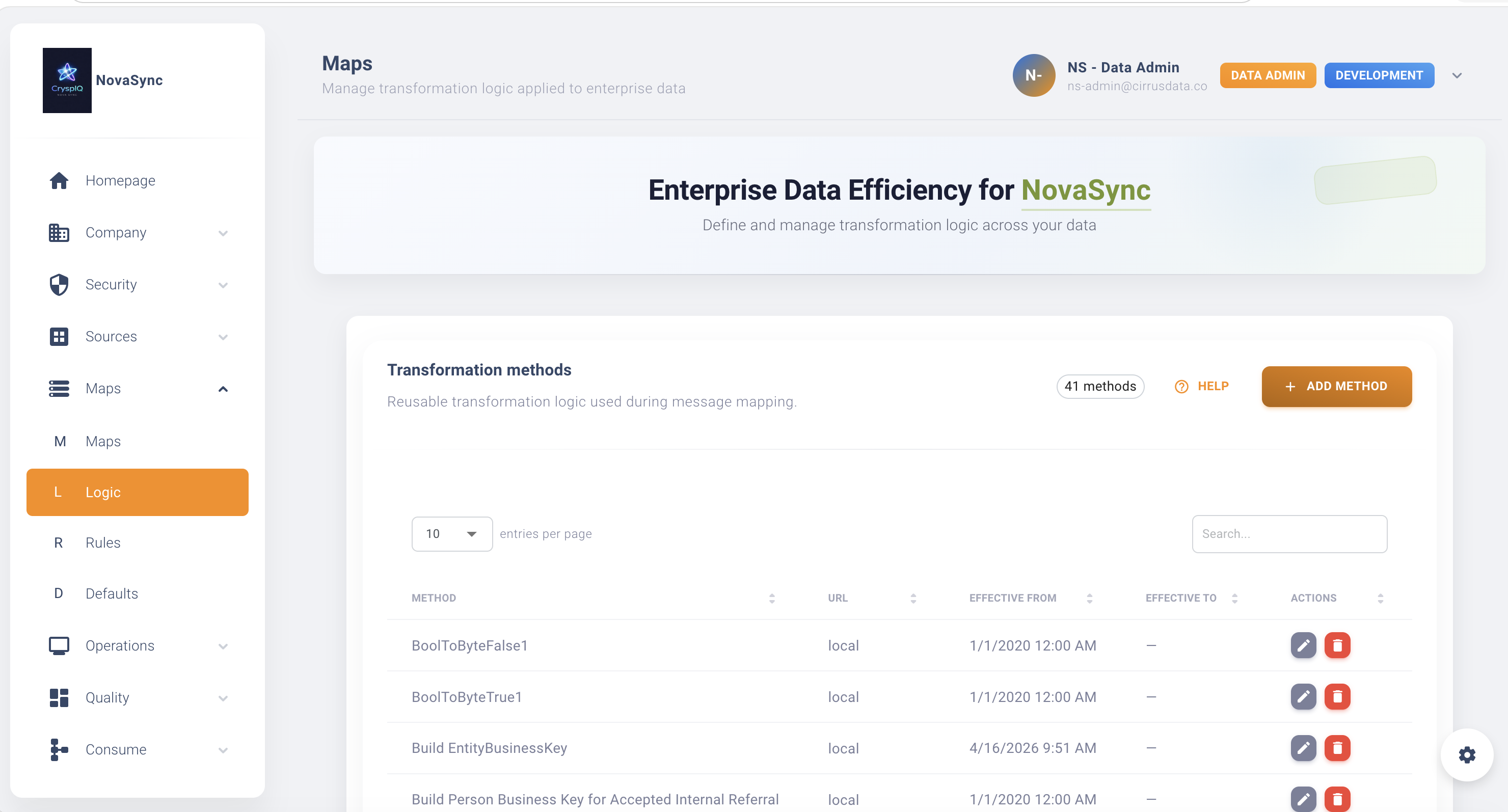
Navigate to Methods
From the main menu navigate to:
Maps → Methods
The Methods page displays the transformation method library.
Create a Method
To create a new method:
- Open Maps → Methods.
- Select Add Method.
- Choose the Scheme:
Local (built-in),Raw (format string), orLookup (URL). - Depending on the scheme:
- Local — pick the method from the dropdown of names IQ.Map actually implements.
- Raw — enter a Method name (a free-text identifier) and type a format template; the URL is composed for you and shown read-only underneath, with a live character counter (see the 250-character limit below).
- Lookup — enter a Method name and the target
https://URL.
- Save the method.
After saving, the method becomes available for use in Message Maps.
Method Name
Use a clear name that explains what the method does. For a local method the name must be one IQ.Map already implements (chosen from the dropdown); for raw: and lookup methods the name is a free-text identifier — it isn't matched against anything, so make it descriptive.
Good examples:
Standardise Status
Format Transaction Date
Lookup Country Code
Avoid:
Method1
Test
NewMethod
Configure Method Logic
The configuration depends on the scheme.
Local
Nothing to configure beyond picking the name — the built-in C# method fully determines the behaviour. There is no URL to set; local methods always dispatch to the built-in method named above.
Raw (format string)
Type a format template in the Format template box. As you type, the modal composes and shows the resulting raw: URL. See Raw (Format String) Methods below for the complete syntax and operation reference.
Lookup (URL)
Enter the https:// endpoint IQ.Map should call. The endpoint is expected to accept the posted field value and record context and return a JSON body IQ.Map can read the mapped value from.
Raw (Format String) Methods
A raw: method's format template is evaluated by a Python format-string service (not by IQ.Map itself, and not arbitrary Python — only the operations listed below are ever run). The composed URL is raw:{your instance's format-string service base}raw/format_string?f=<url-encoded template> — the template itself travels in the f query parameter, not the request body; the record's own field data is sent separately, in the POST body.
Every posted field is silently checked for a dd/mm/yyyy shape before your template ever runs — whether or not your template does anything date-related with that field. Any string value matching that shape (e.g. "31/05/2026") has its slashes rewritten to hyphens ("31-05-2026") as a pre-processing step over the whole posted record, before format_string starts. Single-digit days/months are also zero-padded in the process, so "1/2/2026" becomes "01-02-2026".
The check is a shape match, not a semantic date check — it has no idea whether a field is conceptually a date. Any field whose value merely looks like N/N/yyyy is mutated the same way, e.g. a non-date field such as Score = "7/10/2024" is rewritten to "07-10-2024" (zero-padded, per the same rule above) identically to a genuine date field.
This means plain substitution is not always a pure, unmodified copy of the source value: {TransactionDate} on a source value of "31/05/2026" returns "31-05-2026", not "31/05/2026". It also affects fields a non-date operation is applied to — {EffectiveDate.upper()} on "05/12/2026" returns "05-12-2026" (uppercased, and still silently slash-to-hyphen mutated). There is currently no way for a raw: template to get the literal, unmodified value of a dd/mm/yyyy-shaped field.
The rewrite also recurses into nested dicts/lists, so a field whose posted value is itself a structured object (not a flat string) can have dd/mm/yyyy-shaped values inside it mutated too — it's not confirmed here whether real mapping payloads ever post structured values for a field in practice.
Template Syntax
| Syntax | Meaning | Example |
|---|---|---|
{field} | Simple substitution of a field's value — except a value shaped like dd/mm/yyyy, which is silently rewritten to dd-mm-yyyy before the template runs (see warning above). | {Status} |
{field[start:end]} | Python-style slice of the field's value (either bound may be omitted). | {AccountNumber[-4:]} → last 4 characters |
{field[index]} | A single character at that index. | {Code[0]} → first character |
{field.method()} | One method call on the field's value, no parameters. | {Status.upper()} |
{field.method(param)} | One method call with one or more parameters (quoted strings or bare numbers). | {Amount.round(2)} |
Multiple {...} expressions in one template concatenate — "{FirstName} {LastName}" produces "Jane Smith". This is the only way to combine fields; there is no arithmetic operator between fields (no {Quantity} * {UnitPrice}).
Each {...} expression supports one method call. Chaining — e.g. {Name.strip().upper()} — is not supported and fails the whole method at map time (see When a Template Fails below) rather than silently applying only one of the two methods. If you need two transforms on the same value, do it in two separate fields/steps, or ask whether a local method should be added instead.
A parameter value also cannot itself contain a comma: the service splits a method call's argument list on every comma without regard to quoting, so split(",") — an attempt to pass a literal comma as the separator — is misparsed into extra bogus arguments and fails with an error rather than splitting on a comma. Use a different delimiter if you need to split on one (see split() below).
Allowed Operations
Every operation below is checked against the service's allow-list; anything else — including any bare Python — is rejected.
Case
| Operation | What it does | Example |
|---|---|---|
upper() | Uppercases the value. | {Status.upper()}: "active" → "ACTIVE" |
lower() | Lowercases the value. | {Status.lower()}: "ACTIVE" → "active" |
title() | Title-cases each word. | {Name.title()}: "john smith" → "John Smith" |
capitalize() | Capitalises the first character, lowercases the rest. | {Name.capitalize()}: "JOHN" → "John" |
swapcase() | Swaps upper/lower case per character. | {Code.swapcase()}: "AbCd" → "aBcD" |
casefold() | A more aggressive lowercase, intended for case-insensitive comparison. | {Code.casefold()}: "STRASSE" → "strasse" |
Whitespace
| Operation | What it does | Example |
|---|---|---|
strip() | Removes leading and trailing whitespace. | {Value.strip()}: " ABC123 " → "ABC123" |
lstrip() | Removes leading whitespace only. | {Value.lstrip()}: " ABC" → "ABC" |
rstrip() | Removes trailing whitespace only. | {Value.rstrip()}: "ABC " → "ABC" |
Checks — these return True/False (or a number for len), not a transformed value, so they're most useful combined with a Data Quality Rule downstream rather than as the final mapped value.
| Operation | What it does | Example |
|---|---|---|
isalpha() | Whether every character is alphabetic. | {Code.isalpha()}: "ABC" → "True" |
isdigit() | Whether every character is a digit. | {Code.isdigit()}: "123" → "True" |
isalnum() | Whether every character is alphanumeric. | {Code.isalnum()}: "ABC123" → "True" |
islower() | Whether all cased characters are lowercase. | {Code.islower()}: "abc" → "True" |
isupper() | Whether all cased characters are uppercase. | {Code.isupper()}: "ABC" → "True" |
isspace() | Whether the value is only whitespace. | {Value.isspace()}: " " → "True" |
istitle() | Whether the value is title-cased. | {Name.istitle()}: "John Smith" → "True" |
len() | The character length of the value. | {Value.len()}: "ABC123" → "6" |
Padding — all take a target width. The space-padded examples below are shown in a fenced block rather than inline code, because inline code collapses runs of spaces to a single space — the padding wouldn't otherwise be visible.
| Operation | What it does |
|---|---|
zfill(width) | Left-pads with 0 to the given width. |
ljust(width) | Left-justifies, padding with spaces on the right. |
rjust(width) | Right-justifies, padding with spaces on the left. |
center(width) | Centres the value, padding with spaces both sides (extra padding goes to the right when it can't split evenly). |
"42"
        ↓  {InvoiceNumber.zfill(6)}
"000042"
"AB"
        ↓  {Code.ljust(8)}
"AB      "
"AB"
        ↓  {Code.rjust(8)}
"      AB"
"AB"
        ↓  {Code.center(8)}
"   AB   "
Search, replace and split
| Operation | What it does | Example |
|---|---|---|
replace(old, new) | Replaces every occurrence of old with new. | {Status.replace("_", " ")}: "IN_PROGRESS" → "IN PROGRESS" |
startswith(prefix) | Whether the value starts with prefix. | {Code.startswith("US-")}: "US-1234" → "True" |
endswith(suffix) | Whether the value ends with suffix. | {File.endswith(".csv")}: "data.csv" → "True" |
find(sub) | The index of the first occurrence of sub, or -1 if not found. | {Email.find("@")}: "a@b.com" → "1" |
count(sub) | How many times sub occurs. | {Value.count("a")}: "banana" → "3" |
split(sep) | Splits the value on sep. | {Tags.split("|")}: "a|b|c" → "['a', 'b', 'c']" — see the caution below |
join(iterable) | Joins iterable using the field's own value as the separator. | {Dash.join("ABC")} with Dash = "-" → "A-B-C" — see the caution below |
split() and join() behave surprisingly on their own, because chaining isn't supported (so nothing can consume split()'s result) and because a template parameter is always a literal string or number, never a list:
split(sep)returns a Python list's text representation (e.g."['a', 'b', 'c']"), not a clean value — there's no follow-up method to turn that list into something else.join(iterable)treats the field it's called on as the separator, and its parameter as the string to join — and since a string is iterated character-by-character,{Dash.join("ABC")}insertsDash's value between every character of the literal text"ABC", not between separate fields.
Both are rarely what a Data Administrator actually wants; reach for replace(), slicing, or concatenating separate {field} expressions instead.
Math
| Operation | What it does | Example |
|---|---|---|
abs() | The absolute value. | {Delta.abs()}: "-42.5" → "42.5" |
round(digits=0) | Rounds to digits decimal places (defaults to 0). | {Amount.round(2)}: "19.987" → "19.99"; {Amount.round()}: "19.6" → "20.0" (note the trailing .0 — rounding to 0 digits still returns a decimal number, not a whole one) |
abs() and round() only run on a value the service recognises as numeric, using a simple check (strip out . and - characters and see if only digits remain) rather than a true numeric parse. A value with an embedded, non-leading hyphen — e.g. "1-2" — can pass that check but still isn't a valid number, and fails at map time (see below) instead of being politely skipped. This is a known limitation of the service, not something this guide can work around; keep abs()/round() for fields you know are clean numbers.
Dates
| Operation | What it does | Example |
|---|---|---|
strftime(fmt) | Reformats a date using a Python date-format string. | {OrderDate.strftime("%d/%m/%Y")}: "2026-05-31" → "31/05/2026" |
strftime accepts a plain YYYY-MM-DD date, or a YYYY-MM-DDTHH:MM:SS timestamp with an optional trailing Z or UTC offset. Only the calendar date is kept — the time of day and any offset are always discarded, even when present in the source value. If your target field needs the time preserved, strftime on a raw: method is not the right tool.
Empty handling
| Operation | What it does | Example |
|---|---|---|
if_empty(default="") | Returns default if the value is blank/whitespace-only, otherwise the value with surrounding whitespace trimmed. | {MiddleName.if_empty("N/A")}: "" → "N/A"; " Lee " → "Lee" |
The 250-Character URL Limit
The composed raw: URL is saved into the same database column every method's URL uses, which holds 250 characters. The modal shows a live counter and blocks Save once the composed URL goes over it — this is a hard database limit, not a UI preference, and it's separate from anything about how complex the template itself is.
The overhead adds up faster than the template text suggests, because { and } each expand from 1 character to 3 (%7B / %7D) once url-encoded. For example, on an instance whose format-string service base URL is around 30 characters, the fixed raw:...raw/format_string?f= prefix already accounts for roughly 55 characters — leaving under 200 for the encoded template. A template that concatenates a dozen or more {FieldName} references can exceed that budget well before it looks "long" in the template box. If you hit the limit, shorten field names' round-trip through the template (fewer {...} expressions, shorter literal text between them) or split the transform across more than one field.
When a Template Fails
The format-string service runs in strict mode: an unrecognised operation, a missing field, or an invalid slice raises an error there rather than silently passing through a placeholder or the original value. That error comes back to IQ.Map as a failed HTTP response.
Confirmed from IQ.Map's own handling of that call: a failed response is logged as an error event and IQ.Map throws an exception rather than continuing with a blank or unmapped value — consistent with this platform's general approach of failing loudly on a mapping problem rather than silently loading bad data. What isn't confirmed for this guide is the exact end-to-end disposition of that failure for the record being mapped (for example, whether it quarantines just that record or the whole batch) — if you need that guarantee precisely, verify it against a test map before relying on it for a production feed.
In practice, this means a raw: method that references a field the source message doesn't always populate should be treated as unsafe for that message type — test with a real record from every message variant that will use the method.
Apply a Method to a Message Map
Once a method has been created, it can be applied to fields within a Message Map.
Example:
| Source Field | Target Field | Method |
|---|---|---|
| Status | Status | Standardise Status (raw:) |
| TransactionDate | Fact Date | Format Transaction Date (raw:) |
| CustomerId | Entity Business Key | BuildPersonCompositeKey (local) |
| ExternalCode | Reference ID | Lookup Reference Code (lookup) |
Open the Create Message Maps guide
View Existing Methods
To review a method:
- Open Maps → Methods.
- Locate the method.
- Open the method details.
Use this when:
- Reviewing mapping logic
- Investigating transformation results
- Confirming how source data is standardised
- Understanding dependencies before making changes
Edit a Method
To update a method:
- Open Maps → Methods.
- Locate the method.
- Select Edit.
- Update the required details.
- Save the changes.
Editing a raw: method re-opens with the format template box populated so you can adjust it directly, rather than the composed URL. A hand-edited or legacy raw: URL that doesn't match a template the editor composed stays as a plain, manually-editable URL instead.
Changing a method may affect future data processing wherever the method is used.
Review all related Message Maps before making significant changes.
Delete a Method
To delete a method:
- Open Maps → Methods.
- Locate the method.
- Select Delete.
CryspIQ® prevents deletion if the method is currently linked to a mapping. The method must first be removed from all active mappings before it can be deleted — this protects existing processing configurations from being broken accidentally.
Finding Where a Method Is Used
Before deleting or changing a method, review:
- Message Maps
- Target fields
- Processing dependencies
This helps administrators understand the impact of a change.
Best Practices
Make Methods Reusable
Design methods that can be reused across multiple maps.
Keep Logic Focused
Each method should perform a clear, specific task.
For example:
Format Transaction Date
is better than:
Clean Everything
Prefer local Over raw: When It Already Exists
Check the local dropdown before authoring a raw: template — if IQ.Map already implements what you need, local is simpler and isn't subject to the 250-character URL limit or the format service's error behaviour.
Test raw: Templates Against Real Records
Test a new raw: template against a record from every message variant that will use it, including one where the referenced fields are blank — strict_mode means a missing field fails the whole method at map time rather than degrading gracefully.
Avoid Hiding Data Quality Issues
Methods should improve data consistency, but should not hide poor source data.
Where data is invalid, consider using a Data Quality Rule instead.
Troubleshooting
Method Not Applied
Check:
- The method has been assigned to the Message Map.
- The correct source and target fields are mapped.
- Processing completed successfully.
Existing Row Shows "Invalid — no scheme"
A method with a blank URL can't dispatch in IQ.Map. Edit it and choose local, raw:, or lookup.
Unexpected Output From a raw: Method
Review:
- The template's operations against the allowed operations reference above — an operation not on the list fails the method rather than being ignored.
- Whether the referenced fields are always populated for every message variant using this method.
- Whether the template relies on chaining (
{field.a().b()}) — this isn't supported. - Whether the field's value happens to be shaped like
N/N/yyyy— those values are silently slash-to-hyphen rewritten (and zero-padded) before your template runs, even for a field you don't think of as a date (see the warning in Raw (Format String) Methods above).
Cannot Delete Method
Check whether the method is assigned to a Message Map. Remove dependencies before attempting deletion.
lookup Method Fails
Check:
- The endpoint is reachable over
httpsfrom IQ.Map's environment. - The response format matches what IQ.Map expects.
Relationship to Defaults and Data Quality
Methods work alongside other mapping components.
| Component | Purpose |
|---|---|
| Defaults | Supply missing values |
| Methods | Prepare and enrich data |
| Data Quality Rules | Validate incoming data |
| Message Maps | Apply business context |
Together these components help turn raw source data into trusted, standardised enterprise data.
Related Guides
- Create Message Maps
- Manage Data Quality Rules
- Defaults
- Source Messages
- Upload Source Data
- Data Quality Dashboard
- Navigation
Next Steps
After creating a method:
- Apply the method to a Message Map.
- Test the mapping process, including at least one record with blank or unusual values for any field a
raw:template references. - Review the transformed data.
- Check Mapper and Load Operations.
- Validate reporting, analytics and data quality outcomes.
Methods help ensure source data is transformed, standardised and enriched before it becomes part of the CryspIQ® Enterprise Data Model.