Parking Lot
The Parking Lot provides visibility into records that cannot yet be loaded into the CryspIQ® Enterprise Data Model because required contextual data is missing.
Rather than rejecting these records or loading incomplete information, CryspIQ® temporarily holds them in the Parking Lot until the required context becomes available.
This ensures only complete, governed and meaningful information enters the Enterprise Data Model.
Overview
CryspIQ® relies on contextual data to transform raw records into trusted enterprise information.
During the Prepare process, factual and business object data is matched against existing contextual information.
Examples of contextual data include:
- People
- Organisations
- Products
- Assets
- Locations
- Services
If required context cannot be found, the record is automatically placed into the Parking Lot.
Push
   ↓
Prepare
   ↓
Context Found?
   ↓
 ┌──────────────┐
 │      Yes     │
 └──────┬───────┘
        ↓
      Load

 ┌──────────────┐
 │      No      │
 └──────┬───────┘
        ↓
   Parking Lot
        ↓
Context Arrives
        ↓
 Self-Healing
        ↓
      Load
Why the Parking Lot Exists
Traditional platforms often reject records, generate processing failures, or require manual intervention when required context is missing.
CryspIQ® takes a different approach.
If a record is missing context, it is safely held until the missing information becomes available.
This ensures:
- No data is lost
- Processing can continue
- Data quality is maintained
- Enterprise reporting remains trustworthy
- AI models receive complete contextual information
What Causes Records to Enter the Parking Lot?
Records are placed into the Parking Lot when mandatory contextual data cannot be found.
Common examples include:
Missing Person Information
A transaction references a person that does not yet exist within CryspIQ®.
Example:
Employee ID: 12345
but the employee record has not yet been loaded.
Missing Customer Information
A sales transaction references a customer that does not yet exist.
Example:
Customer ID: CUST001
but the customer master data has not yet arrived.
Missing Product Information
A transaction references a product that cannot be found.
Example:
Product Code: PROD100
but the product master record has not yet been loaded.
Missing Mandatory Context
Contextual records may themselves be incomplete.
Examples include:
- Date of Birth missing
- Gender missing
- Location missing
- Business Function missing
- Product Classification missing
- Service Category missing
Without these mandatory contextual attributes, CryspIQ® cannot establish the required business meaning.
Self-Healing Architecture
One of the key features of CryspIQ® is its self-healing capability.
When the missing contextual data eventually arrives:
- CryspIQ® automatically identifies matching Parking Lot records.
- Context is applied.
- The records are automatically released.
- The records continue through the processing pipeline.
- The records are loaded into the Enterprise Data Model.
No manual reprocessing is required.
Missing Context
        ↓
Parking Lot
        ↓
Context Loaded
        ↓
Automatic Match
        ↓
Release Record
        ↓
Load into CryspIQ®
Responsibilities of the Data Steward
The Parking Lot is primarily used by Data Stewards.
Data Stewards are responsible for:
- Monitoring Parking Lot activity
- Investigating missing context
- Working with source system owners
- Resolving data quality issues
- Ensuring contextual data is complete
The goal is not simply to clear records from the Parking Lot.
The goal is to identify and resolve the root cause.
Common Investigation Process
When records appear in the Parking Lot, follow the steps below.
Step 1 – Identify the Missing Context
Review the record details.
Determine:
- What contextual data is missing?
- Which business object is affected?
- Which source system supplied the record?
Step 2 – Identify the Source Message
Review the source message responsible for supplying the missing context.
Examples:
Customer Master
Employee Master
Product Master
Asset Master
Location Master
Step 3 – Verify Source Data
Confirm the contextual record exists within the source system.
Questions to ask:
- Has the record been created?
- Has the record been updated?
- Has the record been pushed into CryspIQ®?
- Has the Push process completed successfully?
Step 4 – Review Data Quality
Determine whether the contextual record is incomplete.
Common issues include:
- Missing Date of Birth
- Missing Gender
- Missing Classification
- Missing Business Key
- Missing Parent Relationship
Step 5 – Correct the Source Data
Where possible, corrections should occur within the originating source system.
This ensures the issue is resolved permanently.
Step 6 – Re-Push the Contextual Data
Once corrected:
- Push the updated contextual data.
- Allow CryspIQ® to prepare the record.
- Monitor the Parking Lot.
The self-healing process should automatically release affected records.
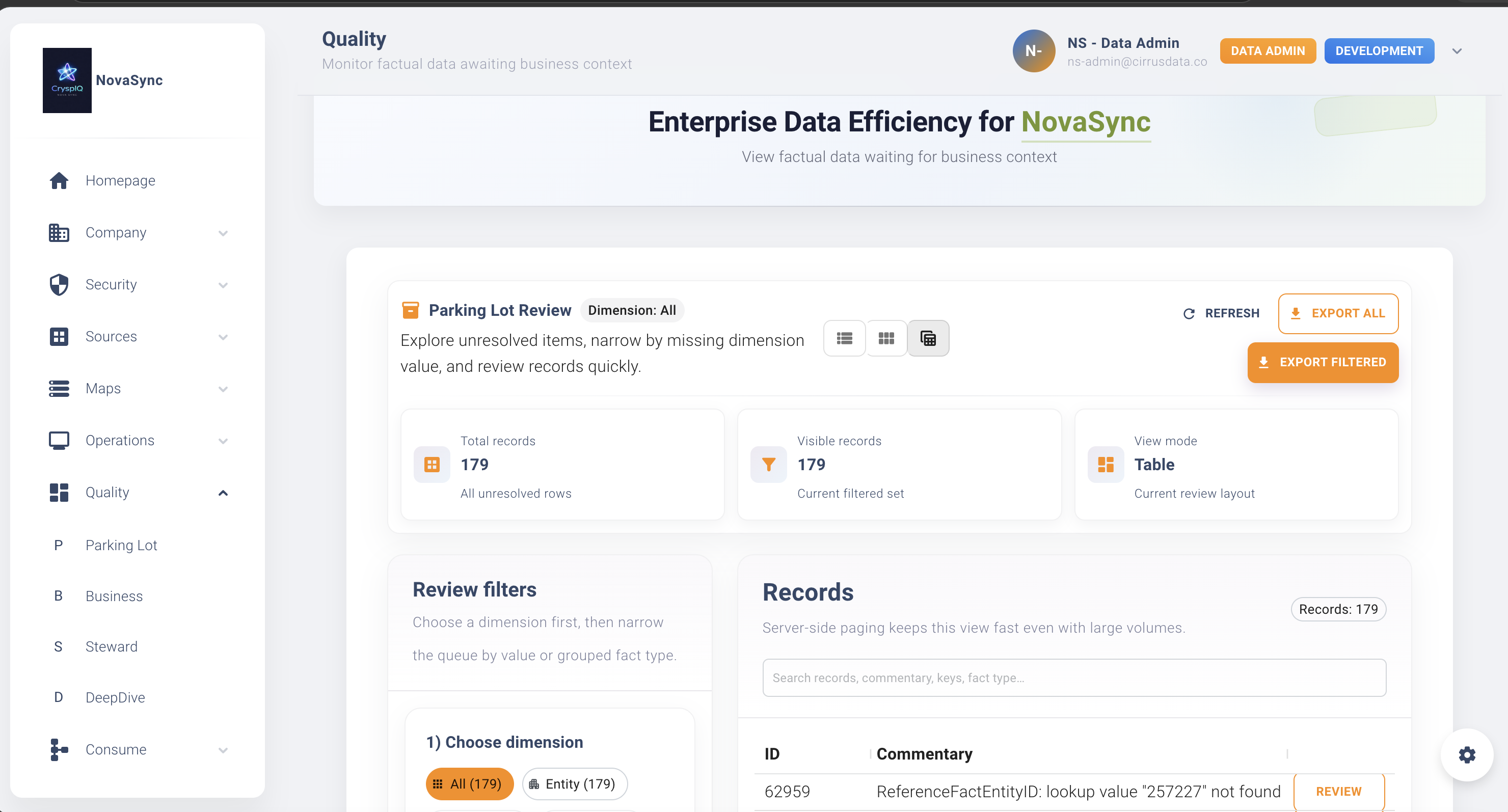
Parking Lot Dashboard
The Parking Lot dashboard provides visibility into:
- Records currently waiting
- Missing context types
- Source messages affected
- Business functions impacted
- Age of records
- Volume of records
This helps Data Stewards prioritise remediation activities.
Monitoring Best Practices
Daily
Review:
- New Parking Lot records
- High-volume issues
- Aged records
Weekly
Review:
- Recurring context failures
- Source system issues
- Missing master data patterns
Monthly
Review:
- Data quality trends
- Steward workload
- Context completeness metrics
Common Root Causes
Master Data Not Loaded
The required contextual record has not yet arrived.
Incomplete Master Data
The contextual record exists but is missing mandatory attributes.
Invalid Business Keys
The transaction references an incorrect identifier.
Source System Data Quality Issues
The source system contains incomplete or inaccurate information.
Mapping Configuration Issues
Contextual records may not be mapped correctly.
Review:
- Message Maps
- Defaults
- Methods
- Data Quality Rules
Benefits of the Parking Lot
The Parking Lot helps organisations:
- Prevent incomplete information entering the Enterprise Data Model
- Maintain reporting integrity
- Improve data quality
- Identify upstream process issues
- Support governance initiatives
- Improve AI outcomes through richer context
Most importantly, it ensures CryspIQ® only loads information that is complete enough to be trusted.
Troubleshooting
Records Remain in the Parking Lot
Check:
- The required contextual data has been pushed.
- The contextual source message has processed successfully.
- Mandatory dimensional fields are present.
- The relevant Message Map is active.
- Business keys match between factual data and contextual data.
Context Arrives but Records Do Not Self-Heal
Check:
- Source identifiers match.
- Contextual records have loaded successfully.
- Mapper and Load services are running.
- There are no processing errors in Operations.
Large Number of Records Enter the Parking Lot
This may indicate:
- Missing master data feed
- Source extract issue
- Mapping issue
- Mandatory field missing from source data
- Upstream source system data quality problem
Review the affected source message and business context as a priority.
Related Guides
Next Steps
If records are appearing in the Parking Lot:
- Identify the missing contextual data.
- Review the source message supplying the context.
- Investigate data quality issues.
- Correct the source data.
- Re-push the contextual information.
- Monitor the self-healing process.
The Parking Lot is not a failure mechanism. It is a governance mechanism that ensures only complete, contextual and trusted information enters the CryspIQ® Enterprise Data Model.